
A low-cost, self-managed setup for comments, abuse prevention, moderation, and email notifications on a static blog.
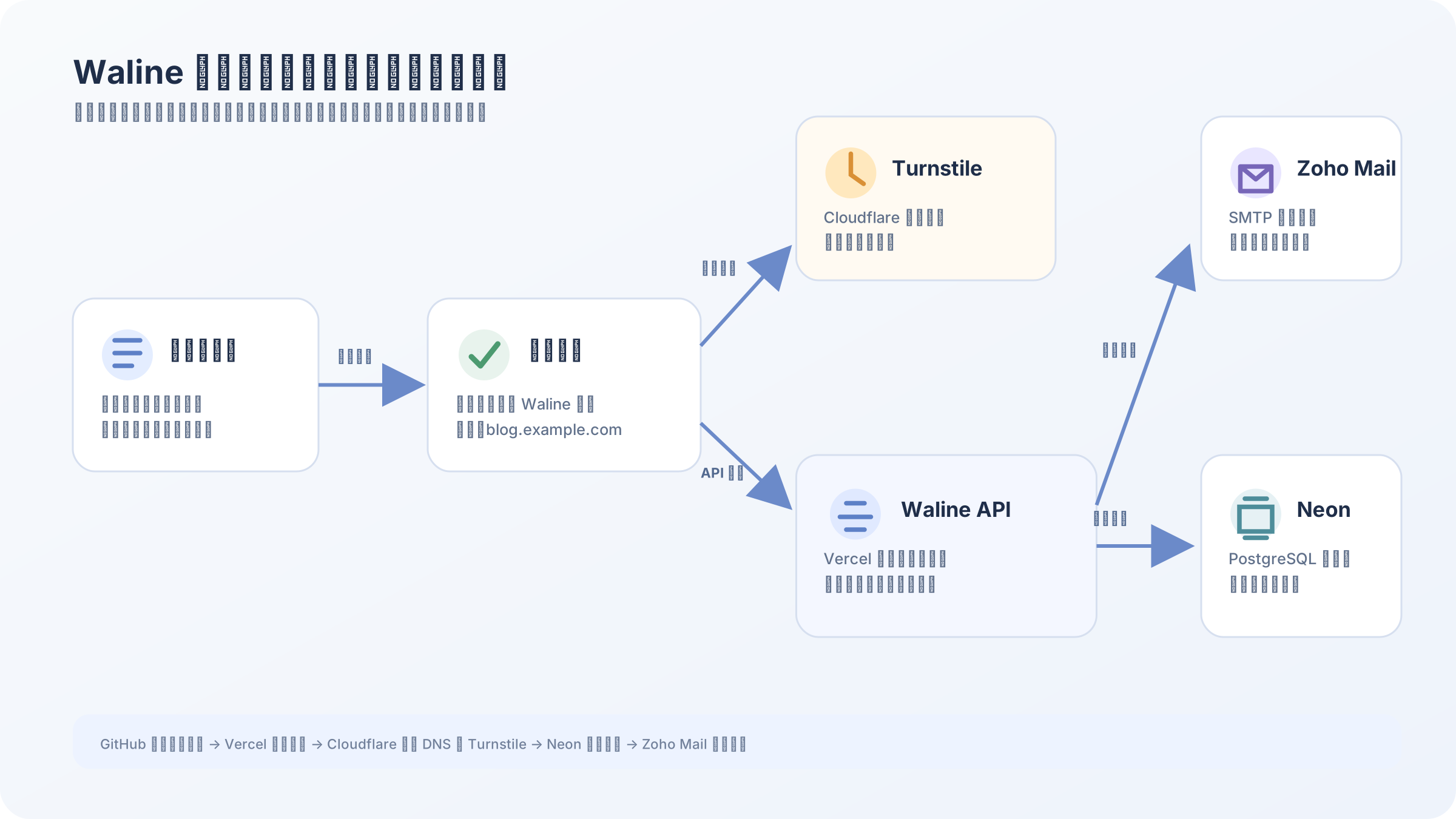
The goal was not to build a complicated community. I wanted readers to leave comments with minimal friction while still receiving notifications, moderating content, and reducing automated submissions.
This article turns that process into a reusable record. To protect privacy, the examples use blog.example.com, comments.example.com, and [email protected]. Site Keys, secrets, SMTP passwords, database connection strings, and admin data are represented only by placeholders.
1. Define the requirements first
The final setup needed five things:
- A comment area at the bottom of blog posts.
- A form for a nickname, email, and comment; the website field is optional.
- Cloudflare Turnstile as a familiar human-verification layer.
- New-comment notifications delivered through Zoho Mail.
- One private admin account, with public Waline account registration disabled afterward.
One detail is easy to misunderstand: a required email field is not email identity verification. A reader can enter an address that does not belong to them, and nicknames and websites can also be impersonated. This setup provides contact and notification, not verified identity. Proving mailbox ownership would require a separate email-code or magic-link flow.
2. What each service does
The important design choice is to let each service handle one focused responsibility:
| Service | Role |
|---|---|
| GitHub | Stores the blog and Waline server code and acts as the deployment source |
| Vercel | Runs the Waline API and provides automatic deployments |
| Neon | Provides PostgreSQL for comments, users, moderation states, and likes |
| Cloudflare | Hosts DNS and provides Turnstile human verification |
| Zoho Mail | Sends new-comment notifications through SMTP |
Zoho Mail is not an account system for readers and does not create a mailbox for every commenter. It is only the sender used when Waline sends a notification; the message arrives in the site owner’s inbox.
3. Deploy the Waline server
The Waline frontend is only the comment component. The stored comments need a server endpoint. The simplest route is to use Waline’s official Vercel server template:
- Create a separate GitHub repository for the Waline server.
- Import that repository into Vercel; the project can be named
blog-comments. - Attach a custom domain such as
comments.example.com. - Add the database, mail, and Turnstile server configuration as Production environment variables in Vercel.
- Visit
https://comments.example.com/uiand confirm that the Waline admin interface loads.
Keeping the server and blog repositories separate is safer. The blog can remain a static site, while the comment service can be upgraded or rolled back without coupling every theme change to the comment system.
4. Use Neon for comment storage
Neon provides hosted PostgreSQL with a low-cost option suitable for a personal project. Waline needs more than one simple comment table: it uses a group of tables for comments, counters, and users.
The typical structure includes:
wl_comment: comment text, nickname, email, website, article path, parent comment, and moderation status.wl_counter: article comment counts and other counters.wl_users: admin users, user types, and login credentials.
Keep database connection details in Vercel environment variables, not in GitHub. A schema file can be committed, but database passwords, connection strings, and admin passwords must never be committed.
Database defaults also affect the frontend. For example, older rows may have a like value of NULL, while newer rows may use 0. Sorting or displaying likes should normalize this with COALESCE("like", 0); otherwise the “hot” sort can appear ineffective or the page can display null.
5. Configure Cloudflare Turnstile
Turnstile is the human-verification component in the comment form. It behaves like the familiar “confirm you are human” control, without requiring the whole site’s traffic to pass through the Cloudflare proxy.
There are two different keys:
- Site Key: used by the blog frontend and visible to the browser.
- Secret Key: used only by the Waline server and never placed in blog code, screenshots, or GitHub.
Create the Turnstile widget in Cloudflare and add the real blog domain. The Managed mode lets Cloudflare decide whether to show an interactive challenge based on risk. The widget may show a loading state, a success state, or a different shape depending on its container width, language, and Cloudflare version.
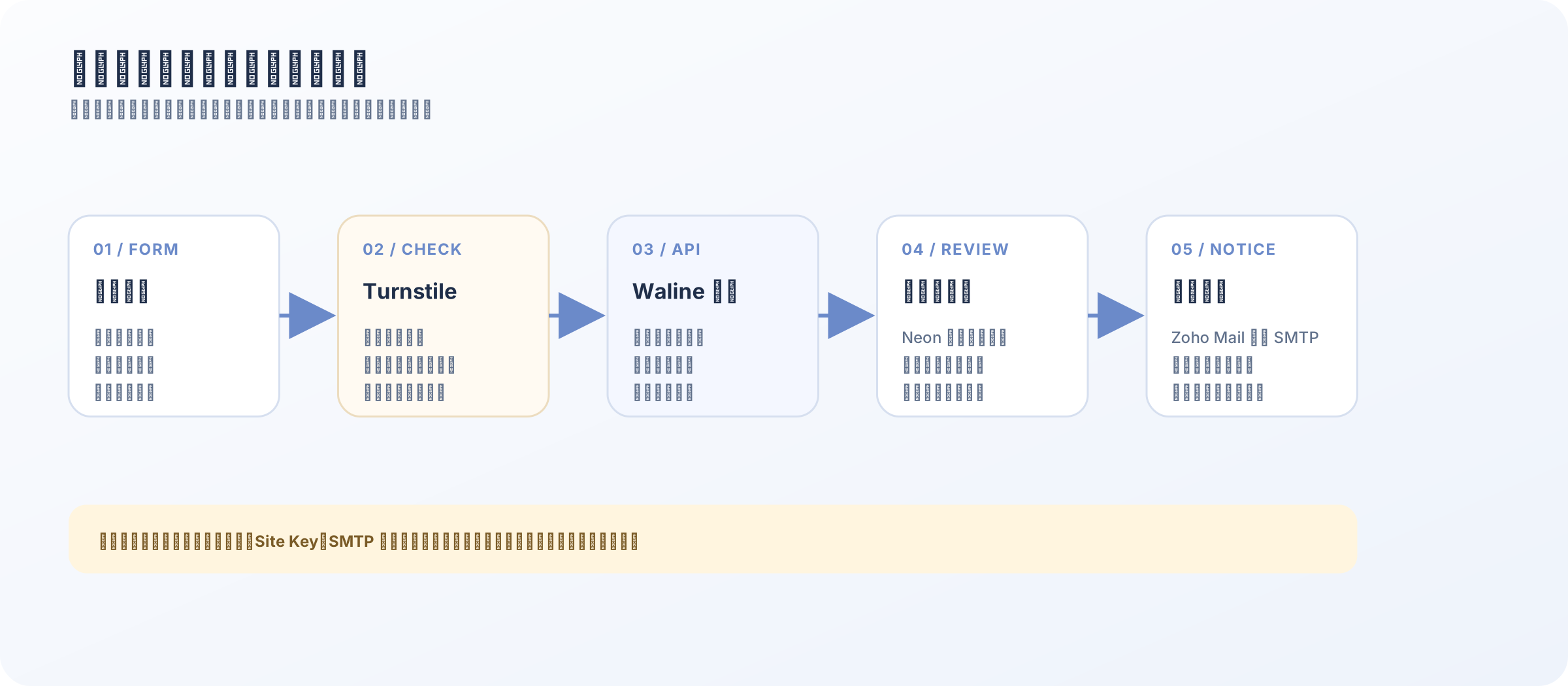
If the widget is pushed to the right or becomes a narrow rectangle, the issue is usually the outer container width or scaling rather than an invalid key. Do not try to style Cloudflare’s internal iframe directly. Give the wrapper a stable width, maximum width, and alignment so the iframe can use its official dimensions.
6. Connect Waline to the blog
The frontend needs the Waline server URL and Site Key. The following is an intentionally redacted example:
1 | new Waline({ |
The email remains required, while the nickname is the public display name and the website is optional. Image uploads are disabled to reduce spam, external-content, and privacy risks.
The form can be styled to match the blog’s visual language: field borders, corner radii, typography, button colors, avatars, and mobile layout are all frontend concerns. They do not require a database change. If the site uses a fixed penguin avatar, it should load from the blog’s own static assets rather than sending real user emails to a third-party avatar service.
7. Send notifications through Zoho Mail
Zoho Mail acts as the SMTP sender. After Waline stores a new comment, it uses Zoho’s SMTP service to send a notification to the configured owner address.
Three details matter:
- Use the domain mailbox prepared for SMTP as the username.
- Prefer a Zoho app-specific password instead of the normal web-login password.
- The recipient can be the same mailbox or a separate internal alias.
A notification usually contains the commenter’s nickname, comment text, and article URL. The email is not shown in the public comment list; it is stored in Waline for notification, replies, or necessary administration.
Run a two-way test after configuration: submit a test comment and confirm it appears on the article, then check that the Zoho inbox receives the notification. When moderation is enabled, the notification may arrive before the comment is publicly visible because the admin must approve it first.
8. Enable moderation, then close public registration
Moderation and registration are separate controls:
- Comment moderation decides whether a new comment is public immediately or waits for approval.
- Login and registration settings decide who can create a Waline admin user.
After moderation is enabled, older or new comments may have a pending status, so a comment disappearing from the frontend does not necessarily mean that it was deleted. Check the pending list in the admin panel and inspect status in the database before removing anything.
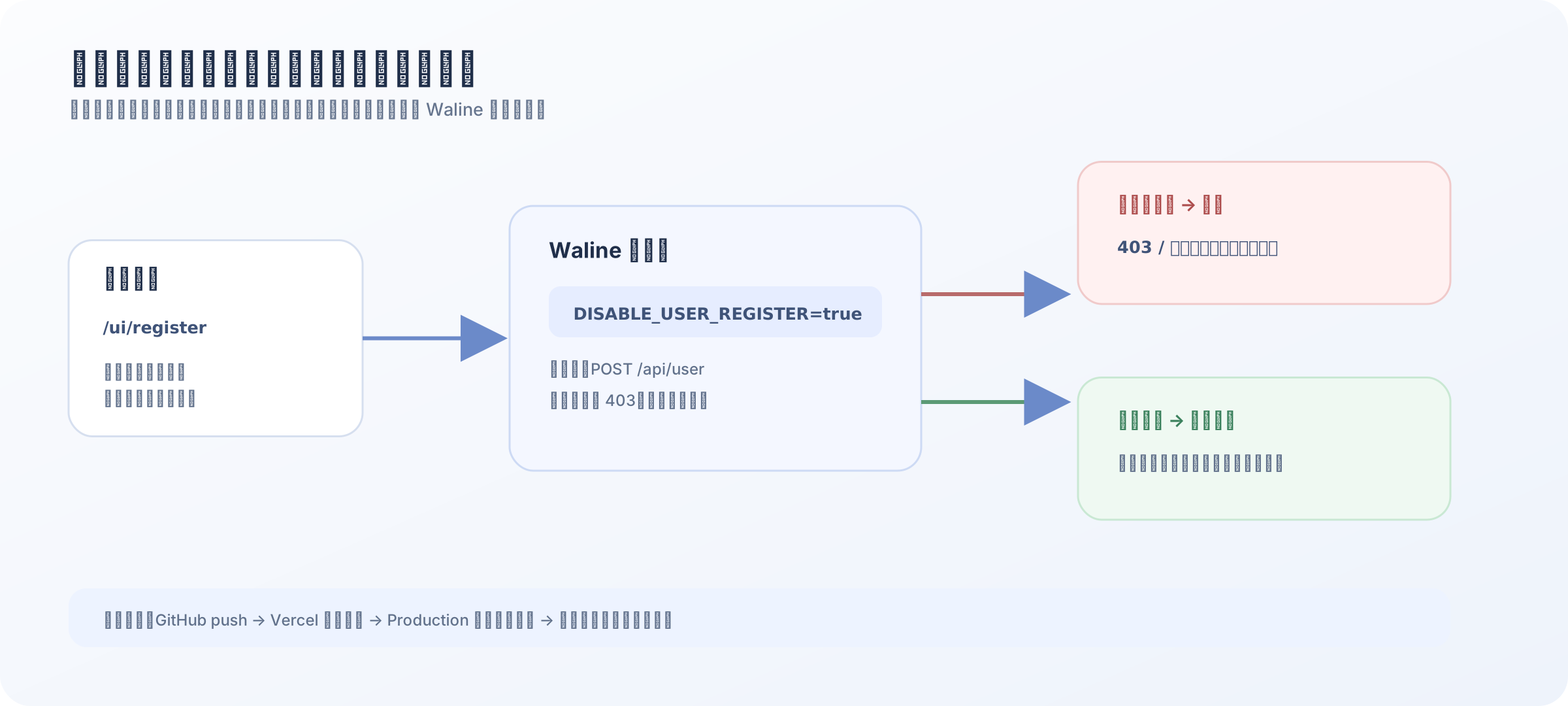
Waline’s admin UI can disable some login paths, but the exact public-registration control varies by version. I therefore added a small backend middleware that intercepts only the user-creation endpoint:
1 | const isRegistrationRequest = |
The scope is intentionally narrow: only POST /api/user is rejected, while admin login, reading comments, posting comments, and likes continue to work. Add the following environment variable in Vercel:
1 | DISABLE_USER_REGISTER=true |
After saving the variable, redeploy the project. The /ui/register page may still be reachable; submitting the registration form will return 403. Hiding the page is a separate route-control problem and should not be confused with the backend permission switch.
9. Verify the deployment in order
After each change, I verify the system in this order so that frontend, backend, and database issues do not get mixed together:
- Confirm that the comment component loads on an article page.
- Use an incognito window to submit a nickname, test email, and comment, then complete Turnstile.
- Check that Neon contains a new row and that its
statusmatches the moderation setting. - If moderation is enabled, approve the comment in Waline and refresh the article.
- Check that Zoho Mail received the notification.
- Use another incognito window to submit the registration form and confirm that it is rejected.
- Log in as the administrator and confirm that moderation, deletion, and replies still work.
This order makes the likely fault easier to isolate:
- Component missing: inspect the frontend configuration and browser console.
- Turnstile failing: check the domain and the Site/Secret Key pair.
- Comment stored but invisible: inspect moderation status and frontend filters.
- Email missing: check Zoho SMTP, the app password, and the spam folder.
- Registration still works: check that the variable is in Vercel Production and redeploy after adding it.
10. The boundaries of this setup
This is not a complete identity system. It is a practical comment foundation for a personal blog:
- Turnstile reduces automated abuse but cannot stop every human spammer.
- An email field helps with contact and notifications but does not prove identity.
- Manual moderation gives the owner the final decision, but it requires occasional review.
- Disabling public registration keeps the admin surface closed but does not delete existing guest users.
- Neon and Vercel are external dependencies, so a backup and migration plan are still worthwhile.
For a personal blog, the trade-off is sensible: the frontend stays lightweight, comments are managed by a separate service, Cloudflare handles abuse prevention, Zoho Mail handles notifications, and the owner only needs to maintain one admin account and a small set of sensitive environment variables.